
Introduction – Google Ads 2026
In 2026, Google Ads remains the most powerful advertising platform in the world. With over 8.5 billion daily searches processed by Google, the platform offers businesses an unparalleled opportunity to reach potential customers at the exact moment they are searching for products or services . Whether you are a small business owner, a marketing professional, or a student exploring digital marketing careers, understanding Google Ads is essential for success in the modern digital landscape.
Google’s advertising ecosystem continues to evolve rapidly, with AI at its core. According to Google, advertisers are already seeing “an average of 18% more conversions at a similar cost per action” when using AI-powered campaign types like Performance Max . At subhswastik, we believe that mastering Google Ads in 2026 requires a blend of strategic thinking, data analysis, and AI-powered optimization.
What is Google Ads?
Google Ads is Google’s online advertising platform where businesses pay to display their ads on Google’s search engine results pages (SERPs), YouTube, Gmail, and millions of partner websites across the Display Network . It operates on a pay-per-click (PPC) model, meaning you only pay when someone clicks on your ad.
The Four Core Components of Google Ads
| Component | What It Does | Real-World Example |
|---|---|---|
| Search Network | Text ads appear on Google search results | A local bakery bidding on “fresh croissants near me” |
| Display Network | Image and text ads on millions of partner websites | A clothing brand advertising on fashion blogs |
| YouTube Ads | Video ads before, during, or after YouTube videos | A software company promoting a tutorial video |
| Shopping Ads | Product listings with images and prices | An e-commerce store showing products with prices |
The Google Ads Ecosystem: What’s New in 2026
AI-Powered Campaigns Are the New Standard
Google has fully embraced artificial intelligence in its advertising products. In 2026, AI-driven campaign types are no longer optional—they are the default recommendation for new advertisers.
Performance Max Campaigns:
Performance Max is Google’s AI-powered campaign type that allows advertisers to run ads across all of Google’s inventory (Search, Display, YouTube, Gmail, Discover, and Maps) from a single campaign . This approach uses machine learning to optimize bids, placements, and creative combinations in real time.
According to Google, Performance Max campaigns are designed to “complement existing keyword-based search campaigns to find more converting customers across all of Google’s channels” .
Privacy-First Advertising
With third-party cookies being phased out, Google Ads has introduced enhanced privacy-focused targeting solutions. This includes:
- Enhanced Conversions: Uses hashed first-party data for more accurate conversion tracking .
- Privacy Sandbox: Google’s initiative to develop new advertising solutions that protect user privacy .
Measurement and Attribution
Google has invested heavily in measurement tools to help advertisers understand the full customer journey. The Measurement Toolkit now includes:
- Attribution: Understand which touchpoints drive conversions.
- Marketing Mix Modeling (MMM): Measure the impact of different marketing channels .
Setting Up Your Google Ads Account
Creating a Google Ads Account
Setting up your Google Ads account is a straightforward process. Here is a step-by-step guide:
- Sign Up: Visit ads.google.com and click “Start Now.”
- Enter Business Information: Provide your business name, website, and location.
- Set Campaign Goals: Google will guide you through selecting goals (e.g., sales, leads, website traffic).
- Set Up Payment: Add your billing information. Google offers a Google Ads free trial for new advertisers in many regions .
- Launch Your First Campaign: Follow the recommendations or customize your campaign settings.
Google Ads Dashboard: Navigating the Interface
Once your Google Ads login is complete, you will be directed to the main dashboard. Key sections include:
- Campaigns: Where you manage all your campaigns.
- Reports: Access detailed performance data.
- Tools: Find the Google Ads keyword planner, audience manager, and other essential tools.
- Billing: Manage payment methods and review invoices.
Google Ads Keyword Planner: Your Secret Weapon
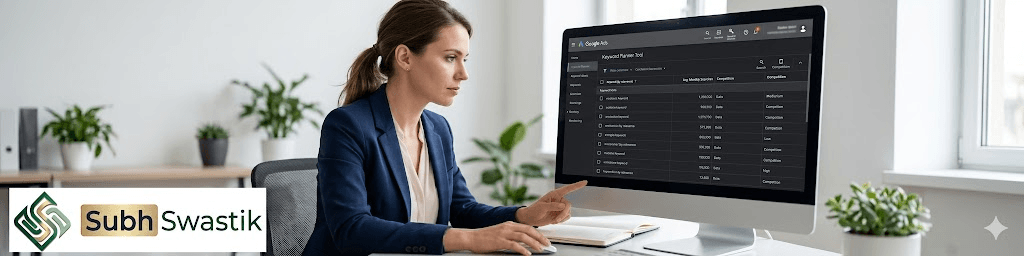
The Google Ads keyword planner is one of the most valuable tools available to advertisers. It helps you discover new keywords, get search volume estimates, and understand competition levels.
How to Use the Keyword Planner
| Step | Action | Outcome |
|---|---|---|
| 1. Enter Keywords or Website | Start with a broad topic or your website URL | Generate relevant keyword ideas |
| 2. Analyze Results | Review search volumes, competition, and suggested bids | Identify high-value opportunities |
| 3. Save Ideas | Save keywords to use in your campaigns | Build your keyword list |
| 4. Apply Filters | Filter by location, language, and date range | Refine results for your target market |
💡 Pro Tip: Use the Keyword Planner to identify long-tail keywords (3+ words). These often have lower competition and higher conversion intent.
Types of Google Ads Campaigns
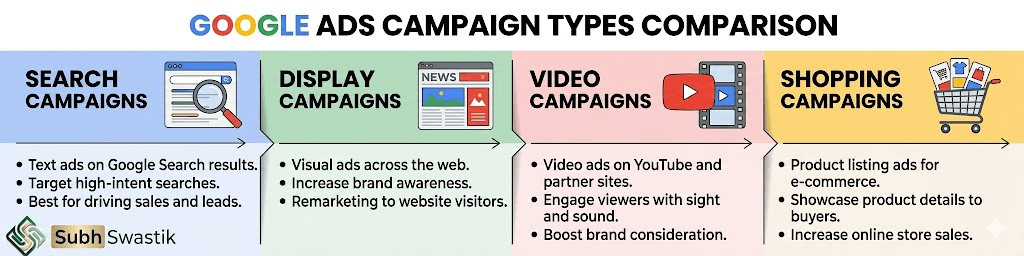
1. Search Campaigns
Text ads that appear on Google search results when users search for specific keywords. Search campaigns are the most common type and are ideal for capturing high-intent users.
When to Use Search Campaigns:
- You sell products or services people actively search for.
- You want to capture bottom-of-funnel traffic.
- You have specific keywords you want to target.
2. Display Campaigns
Image and text ads that appear on millions of websites across the Google Display Network (GDN). Display campaigns are excellent for brand awareness and remarketing.
When to Use Display Campaigns:
- You want to build brand awareness.
- You have visually appealing products.
- You want to retarget website visitors.
3. Video Campaigns
Ads that appear on YouTube and across Google’s video partners. Video campaigns are powerful for storytelling and engagement.
When to Use Video Campaigns:
- You have video content to share.
- You want to reach younger audiences.
- You want to build emotional connections.
4. Shopping Campaigns
Product listings that appear at the top of search results with images, prices, and merchant names. Shopping campaigns are essential for e-commerce businesses.
When to Use Shopping Campaigns:
- You sell physical products.
- You have a Google Merchant Center account.
- You want to showcase products directly in search results.
5. Performance Max Campaigns
AI-powered campaigns that run across all Google inventory. Performance Max is ideal for advertisers who want to maximize conversions across multiple channels.
When to Use Performance Max Campaigns:
- You have specific conversion goals.
- You want to reach customers across all touchpoints.
- You are comfortable with automated bidding and optimization.
Also Read : YouTube SEO Mastery in 2026: The Complete Guide to Ranking Videos and Growing Your Channel
Google Ads Bidding Strategies
Your bidding strategy determines how Google optimizes your ad spend. In 2026, machine learning-powered bidding is standard.
| Bidding Strategy | Best For | How It Works |
|---|---|---|
| Maximize Conversions | Advertisers focused on driving as many conversions as possible | Google automatically sets bids to get the most conversions for your budget |
| Maximize Conversion Value | Advertisers focused on revenue, not just volume | Google optimizes for highest conversion value |
| Target CPA (Cost Per Action) | Advertisers who have a specific cost per conversion goal | Google sets bids to achieve your target CPA |
| Target ROAS (Return on Ad Spend) | Advertisers focused on revenue efficiency | Google optimizes for a specific ROAS target |
| Manual CPC | Advertisers who want full control over bids | You set bids manually for each keyword |
Google Ads Cost: What to Expect
The cost of Google Ads varies widely based on your industry, competition, and location. The average cost per click (CPC) across all industries is around $2 to $3, but some competitive keywords can cost $50 or more .
Factors Affecting Google Ads Cost
| Factor | Impact on Cost |
|---|---|
| Industry | Competitive industries like insurance and legal have higher CPCs |
| Keyword Competition | Popular keywords cost more to bid on |
| Ad Quality | Higher quality ads pay less per click |
| Device | Mobile CPCs are often lower than desktop |
| Location | Targeted locations with high demand increase costs |
Google Ads Account Management: Best Practices
Whether you are using a Google Ads manager (the platform) or hiring a third-party Google Ads manager (a person), effective account management is crucial.
Key Responsibilities of a Google Ads Manager
- Campaign Strategy: Define goals and select appropriate campaign types.
- Keyword Research: Use the Google Ads Keyword Planner to identify high-value keywords.
- Ad Creative: Write compelling headlines and descriptions, and design effective visuals.
- Bid Management: Optimize bids based on performance data.
- Performance Analysis: Monitor metrics and adjust strategies accordingly.
- A/B Testing: Test different ad variations to improve performance.
Also Read :Social Media in 2026: Your Complete Guide to Platforms, Strategy, and Career Opportunities
Common Mistakes to Avoid
- Not Using Negative Keywords: Negative keywords prevent your ads from showing for irrelevant searches, saving you money.
- Ignoring Quality Score: Higher Quality Scores lead to lower CPCs and better ad positions.
- Not Tracking Conversions: Without conversion tracking, you cannot measure the true ROI of your campaigns.
- Setting It and Forgetting It: Google Ads requires ongoing monitoring and optimization.
Google Ads Free Trial and Offers
New advertisers can often take advantage of a Google Ads free trial or promotional credits. Google frequently offers promotional codes for new accounts, matching a portion of your initial spend with free credits. Check the Google Ads dashboard or your region’s Google Ads homepage for current offers.
The Future of Google Ads: AI and Beyond
In 2026, Google’s advertising platform is defined by three key trends:
- AI at the Core: AI is embedded in every aspect of Google Ads, from campaign recommendations to real-time bidding .
- Automated Campaigns: Campaigns like Performance Max are becoming the default recommendation for new advertisers.
- Privacy-First Measurement: Google is developing new solutions to measure ad performance without relying on third-party cookies .
Conclusion
Google Ads remains the most effective way to reach customers at the moment they are searching for what you offer. In 2026, the platform is more powerful than ever, with AI-powered optimization making it easier for advertisers of all skill levels to achieve success.
Whether you are just setting up your Google Ads account or looking to refine your existing campaigns, the key to success lies in continuous learning and adaptation. At subhswastik, we believe that mastering Google Ads requires a commitment to understanding the platform’s features, tracking your performance, and staying current with Google’s latest updates. Start your journey today—the opportunities are limitless.
Also Read : AI Marketing in 2026: The Complete Guide to Tools, Careers, and Strategy
FAQ Section
Q1: What is Google Ads and how does it work?
A1: Google Ads is an online advertising platform where businesses bid to display ads on Google’s search results and partner websites. You pay only when someone clicks on your ad (pay-per-click model).
Q2: How do I log in to my Google Ads account?
A2: Visit ads.google.com and click “Sign In.” Use your Google account credentials (email and password). If you do not have an account, click “Start Now” to create one .
Q3: What is the Google Ads Keyword Planner?
A3: The Google Ads Keyword Planner is a free tool that helps you discover new keywords, get search volume estimates, and understand competition levels for your target keywords .
Q4: What is a Google Ads manager?
A4: A Google Ads manager can refer to either the platform’s Manager Account interface for managing multiple accounts or a professional who manages Google Ads campaigns on behalf of businesses .
Q5: Is there a Google Ads free trial?
A5: Google Ads does not have a traditional free trial, but new advertisers in many regions receive promotional credits when they first spend a certain amount. Check your Google Ads dashboard for current offers .

Leave a Reply