
Introduction
Email marketing is more powerful than ever in 2026. With 4.6 billion global email users, it remains the most effective digital marketing channel. But sending the same email to everyone no longer works. Today’s consumers expect personalized communication that speaks directly to their needs and interests.
That is where email automation comes in. Instead of manually sending each message, automation tools send targeted emails automatically based on specific triggers, subscriber traits, or user behaviors . A welcome email arrives the moment someone subscribes. A cart reminder appears when a shopper abandons items. A renewal notice lands before a subscription expires. Each message reaches the right person at the right time without requiring your attention. At subhswastik, we believe that mastering email automation is essential for businesses looking to scale their marketing efforts efficiently.
What is Email Automation?
Email automation is a technology that sends targeted emails automatically when triggered by specific dates, subscriber traits, or user behaviors . Instead of manually hitting “send” on every message, you set up rules once and let the system handle delivery.
How Email Automation Works
The process starts with a trigger—something happens, and that event tells your system to send a specific email .
Types of Triggers:
| Trigger Category | Examples |
|---|---|
| Actions | Form submissions, purchases, link clicks |
| Dates | Birthdays, anniversaries, subscription renewals |
| Conditions | Joining a specific list segment, reaching a lead score threshold |
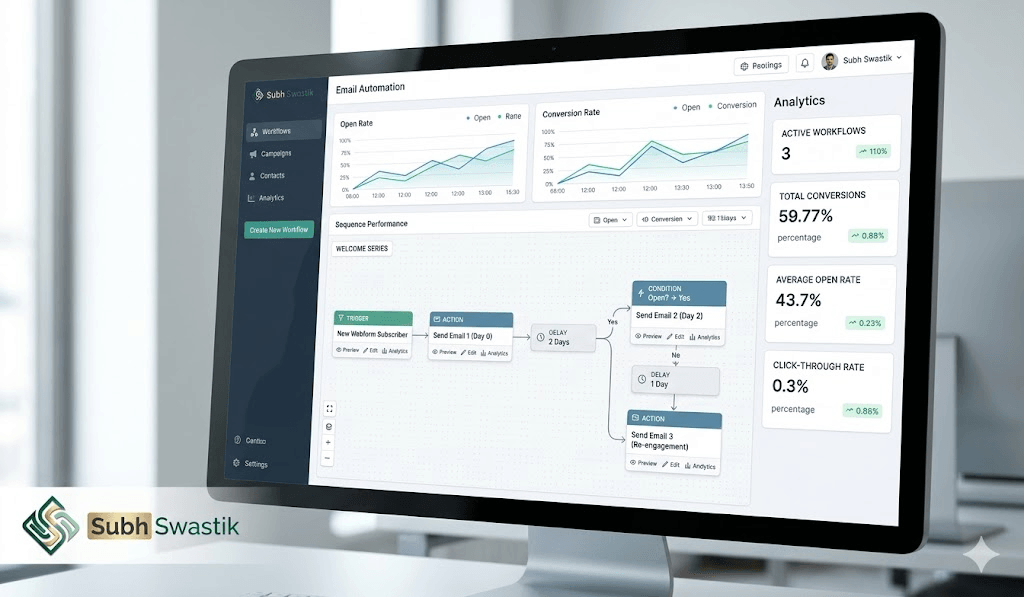
Once triggered, the automation follows the rules you have defined. It might send a single email or kick off a multi-step sequence with delays, branches, and conditions built in .
Automation Email vs. Email Campaigns
Understanding the difference between these two approaches is crucial for choosing the right strategy .
| Feature | Email Campaigns | Email Automation |
|---|---|---|
| Trigger | Manual, one-time send | Automatic, behavior-based |
| Timing | Same time for everyone | Individual timing per subscriber |
| Personalization | Limited to list segments | Dynamic based on behavior |
| Best For | Announcements, promotions, updates | Nurturing leads, onboarding, retention |
Example: A Black Friday promotion works well as a campaign. Everyone receives the offer at the same time. However, a welcome sequence that sends different emails based on how a new subscriber interacts with your content is automation.
The Five Categories of Email Automation Tools
Not all email automation is the same. According to industry experts, AI email automation tools in 2026 fall into five distinct categories, each solving different problems .
Category 1: AI Email Assistants (Inbox-Side AI)
These tools sit inside your inbox and help you write, reply, summarize, or triage emails. They work on emails you receive and send .
What They Do:
- Draft replies
- Summarize long threads
- Suggest responses
- Clean up tone
- Handle scheduling requests
- Automatically categorize incoming mail
Examples: Microsoft Copilot for Outlook, Gemini for Gmail, Superhuman AI, Shortwave
Who Uses Them: Individual professionals, executives, anyone drowning in email volume
What They Don’t Do: Run multi-step outbound sequences, build prospect lists, or monitor deliverability at campaign level
Category 2: AI Cold Email Platforms (Outbound-Side AI)
These tools are built specifically for cold email and outbound sales—sending at scale to people who don’t know you yet .
What They Do:
- Multi-step email sequences with conditional logic
- AI-generated personalized openers
- Domain warmup
- Deliverability monitoring
- Inbox rotation
- Reply detection
- Integration with LinkedIn and CRMs
Examples: Woodpecker, Lemlist
Who Uses Them: Sales teams, SDR teams, agencies, founders doing founder-led sales
Category 3: AI Marketing Automation (Broadcast Email with Intelligence)
These tools send email to lists of opted-in subscribers—newsletters, product updates, nurture sequences, promotional campaigns .
What They Do:
- Segment lists based on behavior
- Predict optimal send times per subscriber
- Generate subject line variants
- Test automatically
- Personalize content based on past engagement
- Manage subscriber lifecycle
Examples: Klaviyo, Mailchimp, Brevo, ActiveCampaign
Who Uses Them: Ecommerce teams, SaaS companies, content businesses
Category 4: AI Transactional Email Infrastructure
This is the plumbing layer. Tools that send operational emails—password resets, receipts, shipping notifications, account notifications .
What They Do:
- Deliver high-volume automated emails triggered by product events
- Manage authentication and deliverability at infrastructure level
- Provide APIs for developers
Examples: Twilio SendGrid, Postmark, Resend, Amazon SES
Who Uses Them: Product and engineering teams
Category 5: AI Email Research and Enrichment
These tools don’t send email themselves but enrich your contact data and research prospects before you contact them .
Also Visit : Top Strategies to Maximize ROI Using WhatsApp Marketing Service in 2026
What They Do:
- Find verified email addresses
- Enrich contact profiles with firmographic data
- Research prospects at scale
- Generate personalized research snippets
Examples: Clay, Apollo, ZoomInfo (enrichment side)
Who Uses Them: SDR teams, sales operations, growth marketers
Best Email Automation Tools in 2026
Based on expert analysis, here are the top email automation tools for different use cases :
Also Visit :Affiliate Marketing in 2026: The Complete Guide to Earning Passive Income
1. Activepieces
The connector layer that powers email automation across your whole setup. You build flows that start from almost any trigger and send emails through providers like Gmail, Outlook, or SES .
Key Features:
- Visual workflow editor
- 502+ pre-built integrations
- AI and MCP support
- Free self-hosted option available
Pricing: Free, then $5 per active flow per month
2. Brevo (formerly Sendinblue)
Designed for small businesses wanting email marketing, simple CRM tools, and automation in one place. Focuses on clear layouts, inbox delivery, and simple steps for building journeys .
Also Visit : Google Ads 2026: The Complete Guide to Mastering Pay-Per-Click Advertising
Key Features:
- Drag-and-drop email builder
- Automation builder with triggers and waits
- Audience segmentation
- CRM tools
- Free plan available with 300 emails/day
Pricing: Free, Starter $9/month, Standard $18/month
3. Lemlist
Focuses on cold email outreach with personalization. Helps you reach prospects through email, LinkedIn steps, and call tasks .
Key Features:
- Outreach sequences
- Personalized content (images, videos, custom text)
- Conditional text rules (if/then/else logic)
- Automatic follow-ups
- Deliverability tools
Pricing: $69/user/month (Email Pro), $99/user/month (Multichannel Expert)
Also Visit : YouTube SEO Mastery in 2026: The Complete Guide to Ranking Videos and Growing Your Channel
4. GetResponse
Works well for small teams, creators, and shops that want email, funnels, and simple sales tools in a single platform .
Key Features:
- Automation builder with triggers, waits, filters
- Autoresponders for timed sequences
- Conversion funnels
- Website tracking
5. Mailchimp
One of the most widely recognized email marketing platforms, particularly for beginners and small businesses.
Key Features:
- Drag-and-drop email builder
- Pre-built automation templates
- Audience segmentation
- A/B testing
- Basic reporting
Also Visit : AI Marketing in 2026: The Complete Guide to Tools, Careers, and Strategy
6. ActiveCampaign
A powerful platform combining email marketing, automation, and CRM capabilities.
Key Features:
- Advanced automation builder
- Lead scoring
- Site tracking
- Conditional content
- Predictive sending
7. HubSpot
An all-in-one marketing, sales, and CRM platform with strong email automation features .
Key Features:
- Email automation with workflows
- Personalization tokens
- A/B testing
- Analytics and reporting
- Integration with entire HubSpot ecosystem
Also Visit : Crafting Your Social Presence: The Power of Facebook Marketing in Gurgaon
Common Mistakes in Choosing Email Automation Tools
Based on industry analysis, teams often make five key mistakes when buying email automation tools :
1. Buying a Marketing Automation Tool for Cold Email
The single most common mistake. Mailchimp, Klaviyo, and similar tools are built for opt-in subscribers. Sending cold email through them typically results in account suspension or domain reputation damage .
The Fix: Use cold email platforms (Category 2) for outreach to people who haven’t opted in.
2. Buying an Inbox AI Tool for Sales Outreach
Shortwave, Superhuman AI, and Microsoft Copilot are excellent for managing your own inbox. They are not built for sending sequences of cold email to prospect lists .
The Fix: Use dedicated outreach platforms for outbound campaigns.
3. Overlooking Deliverability
AI personalization can’t save an email that lands in spam. Deliverability features (warmup, authentication, inbox rotation) matter more than AI personalization .
The Fix: Prioritize deliverability features in your evaluation.
4. Stacking Too Many Tools
Multiple tools with weak integrations often perform worse than one tool that handles 80% of the work well .
The Fix: Your primary sending tool should be the hub. Everything else should integrate with it.
5. Picking Tools Before Mapping Workflow
Teams that pick tools first and then try to fit their workflow around them end up with weird constraints .
The Fix: Map your ideal workflow first, then pick tools to match it.
Free Email Automation Options
Free Built-in Options
1. Gmail + Google Apps Script
Open-source tools let you automate email marketing directly from Google Sheets using Google Apps Script, sending up to 500-2,000 emails per day from Gmail .
Features:
- Send bulk emails from Google Sheets
- Track opens and clicks
- 100% free using Google’s infrastructure
2. Gmail API + Python + Gemini AI
You can build a personal auto-reply bot using Gmail API, Gemini AI, and Python. This runs locally and processes emails without sending data to any cloud .
Features:
- AI-powered auto-replies
- Categorization of emails into labels (Orders, Bank, Bin)
- 100% local processing for privacy
3. Outlook Rules
For Microsoft 365 users, Outlook rules offer a quick way to set up automated replies. Go to Outlook → File → Manage Rules & Alerts → New Rule .
4. Power Automate
Microsoft’s Power Automate provides more advanced workflow automation. Use the “When a new email arrives (V3)” trigger and “Reply to email (V3)” action to build automated flows .
Limitations of Free Options
Important Limitations:
- Volume Caps: Gmail limits daily sends to 500-2,000 emails depending on account type .
- Tracking Basic: Advanced analytics and reporting are limited.
- No Campaign-Level Monitoring: Free tools don’t typically monitor deliverability at scale .
Email Automation Career Opportunities
Email automation is a growing field with significant career opportunities .
Email Automation Specialist Jobs
Skills in email automation are in high demand :
| Skill Required | Tools Experience |
|---|---|
| Building email flows (welcome, cart, post-purchase, winback) | Klaviyo, Omnisend, HubSpot, Iterable |
| Email flow structure and segmentation | Marketing automation platforms |
| Automation logic and retention strategy | Understanding of customer journeys |
| QA and implementation | Email service providers |
Sample Job Role: Email Automation Specialist
A typical email automation specialist role in 2026 involves :
Key Responsibilities:
- Build and maintain email flows for 3-5 client accounts
- Brief email builders (design & copy) clearly
- QA and implement emails in email software
- Manage segmentation, scheduling, and basic automations
- Support lifecycle and omnichannel strategy
Expected Salary: 💰 $1,000/month retainer for part-time (10-15 hours/week), equivalent to $60-100K/year full-time
Conclusion
Email automation is no longer a luxury—it is essential for businesses that want to scale their marketing efforts while maintaining personalization. Whether you choose a free tool like Google Apps Script for small operations or a premium platform like Klaviyo or ActiveCampaign for advanced customer journeys, the key is to start with clear triggers and defined workflows.
At subhswastik, we understand that mastering email automation requires continuous learning. From free tools to enterprise solutions, the options are more accessible than ever. The common mistakes—using marketing automation for cold email, overlooking deliverability, and stacking too many tools—are avoidable with proper planning.
Take the first step today: map your email workflow, identify your primary use case, choose the right category of tools, and start building automations that work for you.
FAQ Section
Q1: What is email automation?
A1: Email automation is technology that sends targeted emails automatically when triggered by specific dates, subscriber traits, or user behaviors. Instead of manually hitting send on every message, you set up rules once and let the system handle delivery .
Q2: How do you automate an email?
A2: You can automate emails using built-in tools like Outlook Rules or Microsoft Power Automate. Set a trigger (e.g., new email arrives), specify a condition (optional), and define an action (e.g., reply with a template) .
Q3: What is the best email automation tool for beginners?
A3: For beginners, Mailchimp offers the most accessible interface with free plans. For small businesses wanting marketing and CRM in one place, Brevo is excellent .
Q4: Are there any truly free email automation tools?
A4: Yes. You can use Gmail API with Google Apps Script for 500-2,000 emails/day, build custom bots using Gemini AI and Python, or use Outlook Rules for simple auto-replies. These run on free infrastructure .
Q5: What is the difference between email marketing and email automation?
A5: Email campaigns are one-time sends to a list at a chosen time. Everyone receives the same message at the same time. Automations run continuously in the background, responding to individual behavior and delivering personalized messages .


Leave a Reply